
This guide is written for the client lead — the person inside your organization running the Lance pilot. Typically that's someone in HR, L&D, or talent operations who has been set up as a Corporate Leader on the GloCoach Dashboard. You're the bridge between GloCoach and your talents and sponsors, and this is the page you'll come back to throughout the pilot.
For pilots above ~20 talents, GloCoach has additional support, templates, and proven best practices we'd love to share with you. Just reach out to your GloCoach contact and we'll walk you through what works at that scale.
Four resources you'll use throughout the pilot.
Bookmark these now. Two are for you to understand the program; two are for your participants to use directly. Share the right one at the right moment.
Use the CL Dashboard as your single source of truth.
The Corporate Leader (CL) Dashboard gives you live visibility into every talent's progress, without waiting for GloCoach to send you updates. Three minutes to get oriented.
Getting into the Lance Interview Tracker
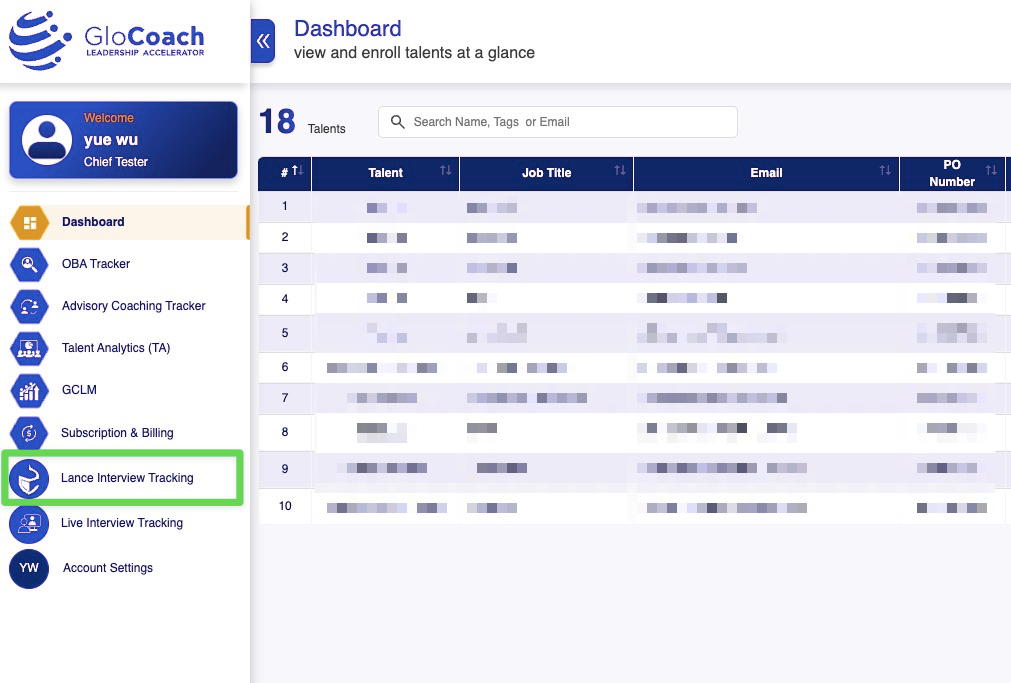
- Check your inbox for your welcome email — it has the subject line "Welcome to the GloCoach family, [Your Name]!" and comes from your GloCoach point of contact. Click the CONFIRM YOUR ACCOUNT button to set your password. This activates your Corporate Leader account.
- Log in to your dashboard at
glocoach.com/dashboard. Bookmark this; you'll use it weekly. - On the left-side menu, click
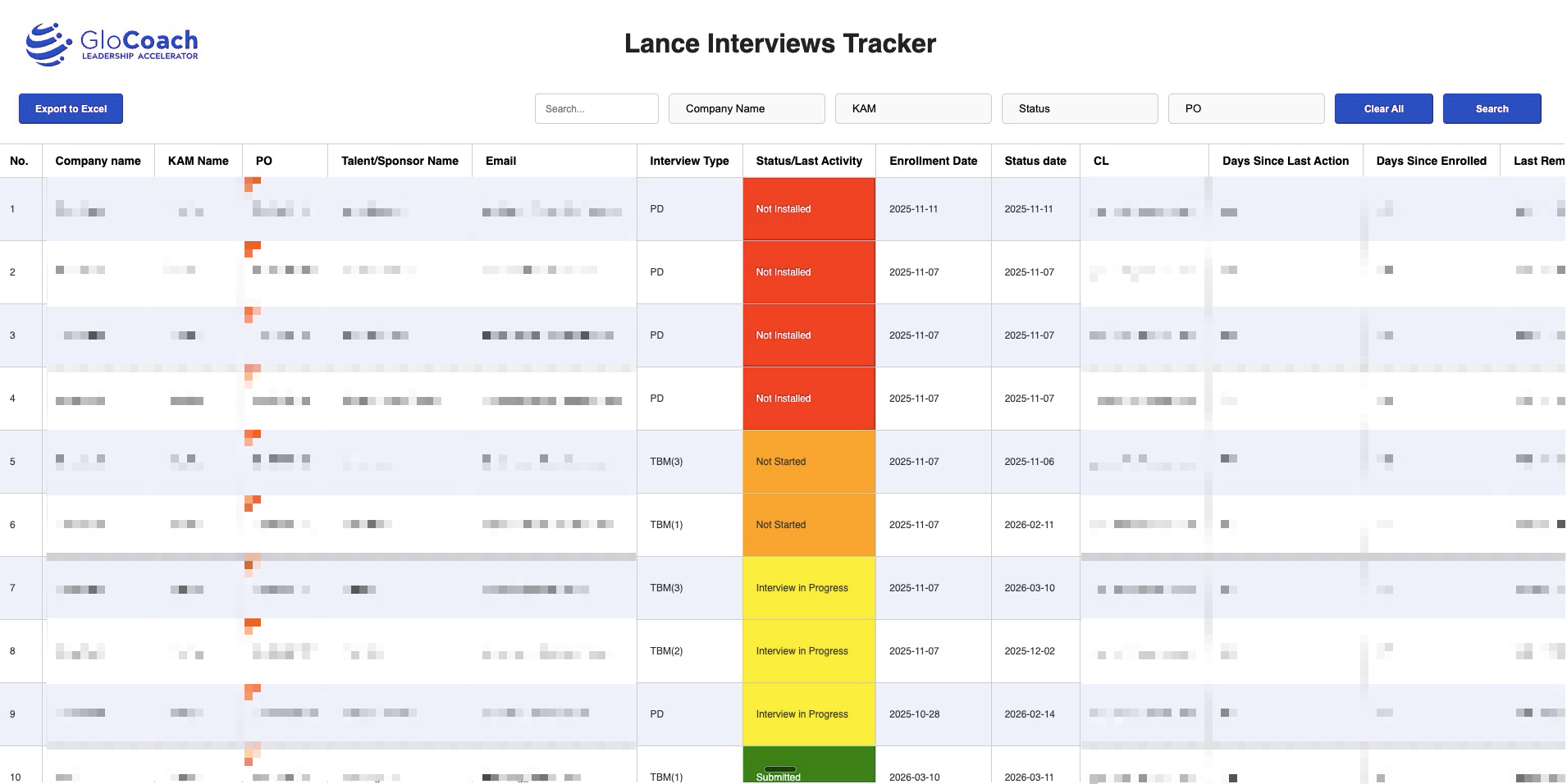
Lance Interview Tracking. This is the live status of every talent and sponsor in your pilot. - Use the filters at the top (Company, KAM, Status, PO) to narrow to your cohort. Click any column header to sort.
- Click Export to Excel when you want a snapshot to share with your team or paste into a weekly internal report.
- Watch these columns: Status/Last Activity (the color-coded current stage), Days Since Enrolled (time pressure), and Days Since Last Action (engagement freshness).
Can't find your welcome email? Check your spam or promotions folder for messages from @glocoach.com. If it's not there, ping your GloCoach point of contact and we'll resend.
Five stages. Five plays.
Each Friday or Monday, pull the tracker and bucket your talents into these five stages. Then run the corresponding play. Same data, focused action.
The talent has finished their conversation with Lance, but hasn't pressed the Submit button in the app. The work is done; the system just hasn't received the final confirmation, so the report isn't generated yet. One click away from completion.
Reach out individually (WhatsApp, Email, or a short call). One short, warm reminder usually does it. These are the highest-conversion touches you'll do all week.
The talent has started a conversation with Lance but hasn't finished. Lance supports pause and resume — they can come back anytime and pick up where they left off.
Send a gentle reminder that pausing is fine and they can return whenever it's convenient. Don't pressure — just remind that the path is open.
The talent has downloaded and installed the Lance App but hasn't started the conversation yet. Intent is there — they just haven't found the time, or they're not sure how to begin. This is your highest-potential group: low effort to convert, high yield.
Send the "How to Chat with Lance" guide to lower their activation barrier. Encourage them to block a quiet 30 to 40-minute window. A simple "have you had a chance yet?" works.
The talent has received the activation email but hasn't downloaded the Lance App yet. This is often the largest group early in a pilot. They may have missed the email, lost the link, or simply not got around to it.
Send a group reminder with the download instructions and the Lance Program Overview link. Help them understand the value first, so the download feels worth their time.
The talent has finished and submitted. The system generates the OBA Report and IGP Growth Plan within a day, delivered to their inbox.
Confirm they've received the reports, then invite them to share post-program feedback. This is the best moment to capture qualitative reflections that fuel testimonials, case studies, and future product improvements.
A suggested cadence to keep momentum.
You don't have to follow this exactly. But a consistent weekly rhythm prevents the "I'll get to it later" drift that kills pilot completion rates. Most KAMs spend 30 to 45 minutes per week on this.
Need a hand? We're here.
For technical issues — a talent can't log in, a sponsor email bounces, the dashboard isn't showing the right numbers, the app crashes mid-conversation — email support@glocoach.com and our support team will be on it within the same business day.
For all other inquiries — scaling beyond the pilot, custom analytics, cross-cohort reporting, commercial questions, or anything strategic — email info@glocoach.com or reach out directly to your GloCoach contact.